

SItemesh 3D Australian designed CCTV Camera planning tool
Sitemesh 3D was designed to provide an easy way to plan a cctv installation by overlaying cameras on Google maps. The overlays show the performance of the cameras with colour coded areas representing the DORI regions specified in EN 62676-4.
The DORI distance is a “general proximity” of distance which makes it easy to pinpoint the right camera for your needs. The DORI distance is calculated based on sensor specification and lab test result according to EN 62676-4 which defines the criteria for Detect, Observe, Recognise and Identify respectively. In plain language it shows you the distance where the camera will detect, observe, recognise, or identify a person based on the cameras number of pixels and the field of view.
Sitemesh 3D uses Google 3D maps to allow users to find their structure by address and then place cameras on the structure. Structures include any building, wall, fence, tower, pole etc.
The camera height is taken from the structure and can be adjusted. The camera bearing, camera tilt, horizontal field of view, vertical field of view, camera height, are all used to calculate the DORI based on a nominated target height.
Essentially this is displayed as a color coded coverage map and allows the planner to select a camera that will meet the performance requirements as dictated by the purpose and location.
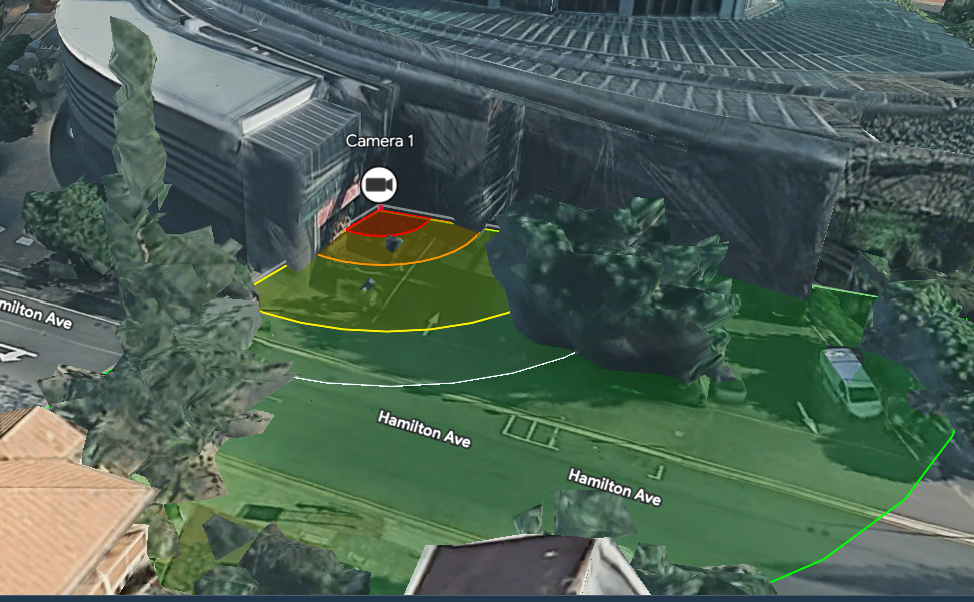
| Legend | |
|---|---|
| Red | Identify region |
| Orange | Recognise region |
| Light Green | Observe Region |
| Dark Green | Detect Region |
| White Arc | Edge of IR Illumination Region |
DORI coverage is at the target height (1.6m in this example).
DORI coverage bands depict optical resolution boundaries based on lens parameters, mounting height, and target elevation. When rays intersect an obstacle, coverage terminates at the obstacle facade; areas masked directly behind structures are considered obstructed line-of-sight.
The DORI coverage bands show where they intersect with an object as can be seen in the image above. It is important to note that the coverage appears to continue behind the object and in the real world will terminate at the object i.e. the object is not transparent so the camera cannot see through it. The effect is due to the DORI coverage being overlaid on the map at the target height and 3D objects protruding through this coverage at the target height.
The coverage above shows that identification with this camera is quite close to the entrance whereas detection extends across the street. During night time the realistic coverage ends just past the kerb on the street as indicated by the white arc representing IR distance. The camera is a wide-angle fixed lens camera which is good for general detection at entrances. Where identification further out was a requirement then a different camera or multiple cameras should be tested.
The above example shows very quickly how a particular camera will perform in a specific location. Datasheets will provide this information and any camera with a datasheet listing the cameras specifications can be used to create a camera and model its performance when using Sitemesh 3D.
My building or home hasn’t been built yet or isn’t shown on Google maps.
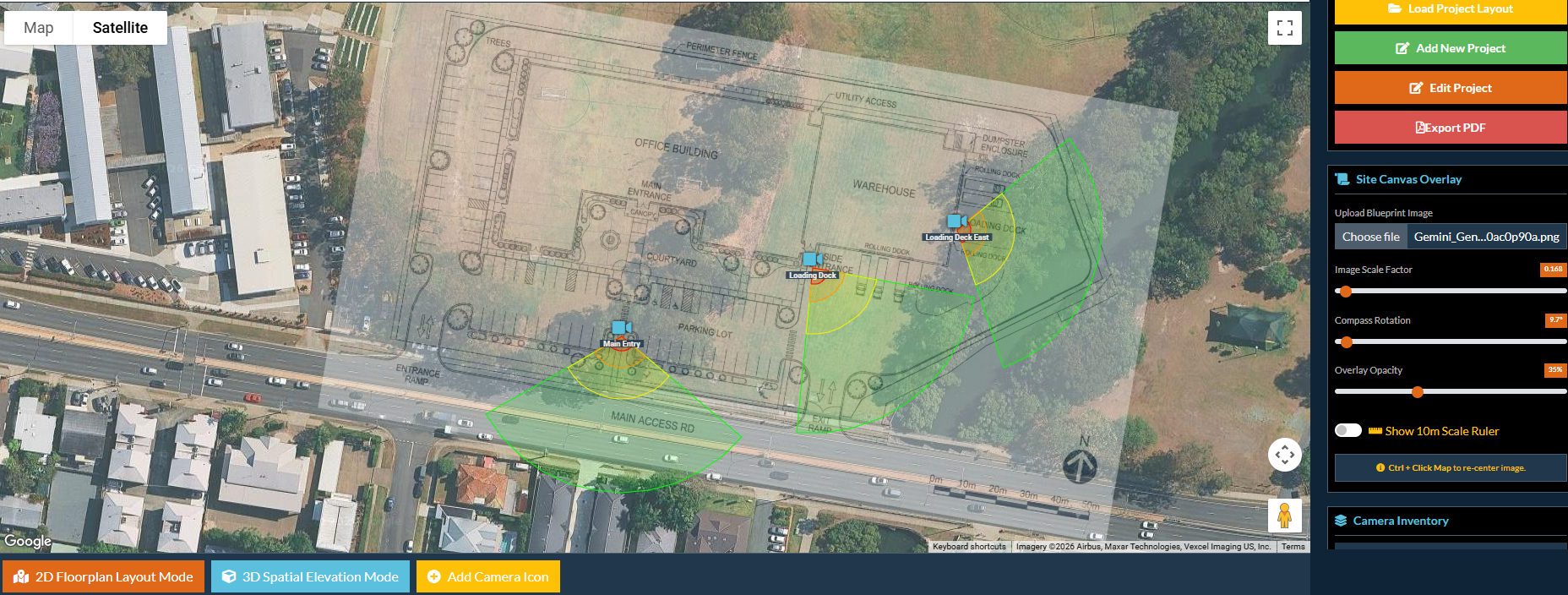
Sitemesh 3D includes a facility to upload and position a site or building plan. This plan is placed and scaled on the 2D flat map and the cameras then placed based on the plan. Switching to 3D maps will then allow you to accurately set heights for your cameras and simulate the built installation. An export of the camera settings can be included in the construction documents for installation of the cameras.
Camera Libraries
Sitemesh 3D are adding cameras to their library on a regular basis. You don’t need to use their libraries as you can add camera data directly into the model and the DORI regions will be calculated from the camera specifications. The libraries simplify adding cameras and allows the user to try other cameras that they may not have data sheets. If there are cameras you want listed you can ask Sitemesh 3D to add them to the library. You can filter the camera library by adding your preferred camera brands in your account. This reduces the number of cameras presented in the selection list to those brands you prefer. Note that camera libraries are only included in the paid plans.
What does it cost?
Sitemesh 3D have several pricing options:
- Free plan – 14 days use after which time it no longer functions. Up to 4 cameras and 1 project to allow you to test the system. No access to the camera library or PDF reports. Includes 125 tokens.
- Project plan – $20 + GST per month, just turn off auto renew when you no longer need the system. Up to 2 projects and 24 cameras per project. Camera libraries and PDF exports are available. Ideal for single projects i.e. home owners wanting to plan their own surveillance system, part time installers planning installations for customers. Includes 250 tokens
- Commercial Installer Plan – $30 + GST per month. Unlimited projects and cameras. Full access to cameras and DPDF reports.. Ideal for installers working on many projects. Expandable to include team members. Includes 1200 tokens
- Team Member plan – an add on to Commercial Installer Plan. – $20 + GST per team member per month. Team members can access all projects of the Commercial Installer account. Team tokens are pooled with the Commercial Installer tokens creating a wider resource pool. Ideal for security companies with multiple employees working on projects. Includes 600 tokens
- Token Refills – Need more tokens for busy periods? You can top up tokens at any time (paid plans only). Top up tokens are only drawn on when subscription tokens are exhausted. They do not expire and ensure continuity when working on projects. Refill tokens are $10 + GST for 100 tokens.
Tokens are a way to ensure that resources are fairly accounted for. Tokens are used when using Google Maps during API calls to pay for Google resources. Tokens and plan costs will be adjusted from time to time to ensure there are resources available for all users. We don’t envisage the average user exhausting tokens unless there is a heavy use of resources.
Active Online Security Offer
Sign up to Sitemesh 3D and use it to design your project. If you purchase the cameras from us we will take 50% of the monthly fee at Sitemesh 3D for a single user (Commercial or Project) off the price of your system. For example, you have a Project plan ($20 + GST) we will take 50% ($10 + GST) off the price if you purchase those cameras from us. Just send us your PDF export for your project and we will include the discount in your order.